
Clock and date
A large clock and today's date in your family's language.
UrusFamily TV
UrusFamily TV is a Malaysian family display app for Android TV and Google TV. It shows today's chores, each person's points, the family goal, calendar events and birthdays on the living room screen. A parent pairs it by scanning or typing a code in the UrusFamily phone app. No money, health or private notes ever appear on the TV.
UrusFamily TV is the family board that shows chores, points and the family goal on your living room TV.
Coming soon to Google Play
For Android TV and Google TV. Apple TV, Samsung and LG are coming.
See a code on your TV? Open UrusFamily on your phone, go to Family TV, tap Add a TV.
See the steps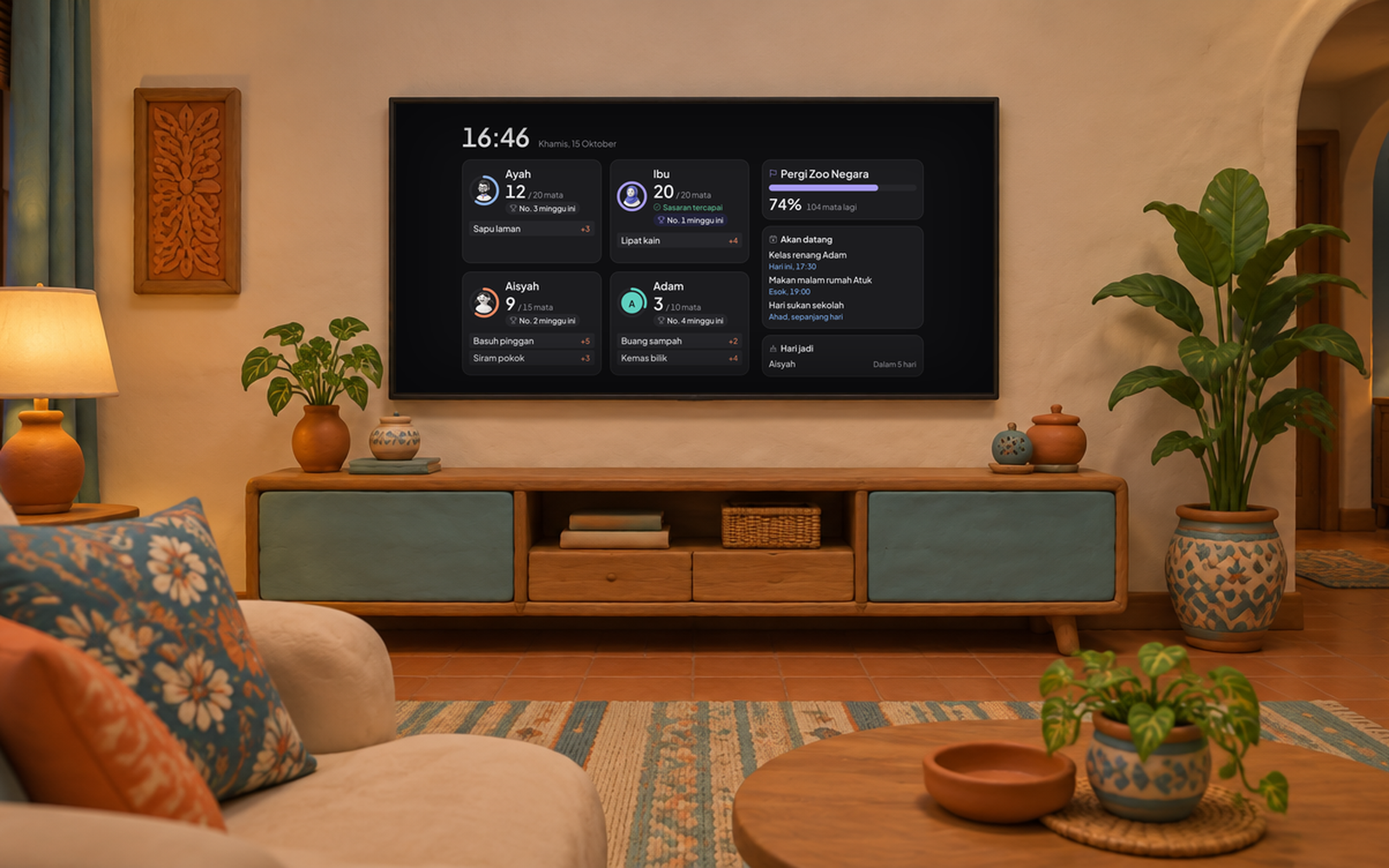
The family's day on one screen, readable from the sofa.
A large clock and today's date in your family's language.

Avatar, a ring for today's points against target, and this week's rank.

Up to three next chores for each person, with their points.

A progress bar for the shared goal and how many points are left.

Events for the next seven days and birthdays within 30 days.

One short line written on the phone for the whole house.
A TV sits where everyone walks past, so it only sees what it needs.
No typing on the remote. A parent's phone approves it.
Open UrusFamily TV on your Android TV or Google TV. The TV shows an eight character code and a QR code.
On your phone, open UrusFamily, go to Family TV and tap Add a TV. Scan the QR code on the TV or type the code.
Enter your password again, name the TV and tap Approve. The family board appears within a few seconds.
Only a parent or adult member can pair a TV. The code changes every 10 minutes.
Android TV and Google TV first, including smart TVs and streaming boxes that run them. Other platforms follow.
| Platform | Minimum version | Status |
|---|---|---|
| Android TV and Google TV | Android TV 9 or newer | Coming soon to Google Play |
| Apple TV | tvOS 17 | Coming |
| Samsung | Tizen 6.0, 2021 models and newer | Coming |
| LG | webOS 6, 2021 models and newer | Coming |
The TV app is free to download. How many TVs you can link follows your family plan, and UrusFamily is free during the launch period.
1 TVFree plan
Up to 5 TVsPremium, RM 9.90 a month or RM 79 a year for the whole family
Parents stay in control, from the phone, all the time.
Data is handled under Malaysia's Personal Data Protection Act 2010 (Act 709). No ads and no third party trackers on the TV.
Yes, for older TVs or a tablet. The TV app, though, needs no spare phone, no parent login left open and no charger plugged in all day.
Yes. The TV refreshes the board about every 30 seconds. If the internet drops, the last board stays on screen with the time it was last updated, and is cleared after 48 hours.
Only on a touch screen. Your child taps their name, enters their own PIN, then ticks the chore. A TV driven by a remote is view only, and chores that need a photo as proof are finished on the phone.
Not yet. UrusFamily TV starts on Android TV and Google TV. Versions for Apple TV, Samsung and LG are coming.
The Free plan allows 1 TV. Premium allows up to 5 TVs per family, at RM 9.90 a month or RM 79 a year.
Open Family TV on your phone and remove that TV. Within about a minute the TV goes back to the pairing screen and the family data stored on it is wiped.
Only if a parent turns on Show family photos on this TV. The setting is off by default for every TV, and photos never show at night.
UrusFamily TV needs the UrusFamily app on iPhone or Android. The TV app is coming soon to Google Play.