

UrusFamily Download

Everything UrusFamily does for your home

UrusFamily brings chores, points, allowance, groceries, the calendar, documents and festive seasons into one family app. This page lists every function by what a parent actually does each day, not by the app menu. Everything is open and free during the launch period.

Download on the App StoreGet it on Google Play

Free on iPhone, iPad and Android.

The Family screen: today's points and each member's progressThe Today screen: the next chore, the festive season and the chore listThe Calendar screen for October with today's events
  • 228ready chores
  • 28badges for effort
  • 4languages in the app
  • 0ads on kids' screens

How do I share out the housework?

Assign in seconds, or let the kids claim chores themselves.

183 ready chores

Sorted by room and by age, from tidying toys to clearing the drain.

Tap a task for its details, tick the circle when it is done. Add a description and a location.

Give one task to several people at once. Kids see their own tasks apart from the ones up for grabs.

The family Chores screen: today's chores and who is doing them

Size and repeat

Tiny, small, medium or big, daily, school days, the days you pick or weekly.

Proof photos

A child sends a photo, a parent approves, the photo is deleted after checking.

Family chore pool

Unclaimed chores can be picked up by whoever is free.

Personal to-dos

A private list for homework, hafazan or anything personal.

The Now widget

Your next task in big type, how long until it, and a countdown to the family's next special day. Right on your iPhone or Android home screen.

Now widget: Pay the TNB bill at 12:00, 42 minutes to go, the next three tasks and a countdown to Adam's birthday

How do I motivate without nagging?

Points make effort visible. The family goal makes that effort mean something.

One family goal

A zoo trip, something for the house, or a donation. Every point pushes the bar.

The Family goal widget, Zoo Negara at 77 percentThe Kids widget: Aisyah at 9/15 and Adam at 7/10

Points follow the size of the job

Bigger jobs carry more points, so the split feels fair.

Daily streaks and levels

The streak holds the habit, the level shows the long run.

Badges

28 badges for the effort that usually goes unnoticed.

Weekly challenge

One light challenge for the whole family each week.

Take points back, kindly

Hold points and allowance back for bad behaviour, return them when they make up.

How do I handle allowance and kids' money?

The wallet is in the app, the real money stays with you.

Allowance tied to effort

Set a rate per point, for example RM 0.10, with a weekly cap. There is no payment inside the app.

  • Save, spend, giveThree simple pots so a child sees where the money goes.
  • Spend requestsA child asks, a parent approves or declines, the balance updates.
  • Duit raya and savingsRecord duit raya, gold and accounts such as ASB, with no account numbers.
  • Family subscriptionsNetflix, Unifi and insurance in one list, with a reminder before each bill.
The Wallet screen: an RM 12.50 allowance balance and spend requests

How do I run the home each week?

Groceries, meals, the calendar and notices, shared together.

Grocery list with a budget

The last price paid is shown, so you see when a price goes up. Add a photo so the right item gets bought.

The grocery list screen with a budget

Family menu

Plan a week of dinners, and the ingredients flow into the grocery list.

The meals screen for this week with a dinner for each day

Calendar

School, tuition, kenduri, public holidays and trips back to the kampung.

The month calendar widget for October with upcoming eventsThe this week widget with five events

Notice board and house rules

Announcements, rules and family meeting decisions.

The family notice board screen with the latest announcements

Document vault

Private documents in your family account. MyKad or passport expiry dates are reminded.

How does it follow the seasons and your family's faith?

Ibadah features are optional. Season packs follow the Malaysian calendar.

A clay illustration of a ketupat, a pelita, a red lantern and a crescent moon

Festive season packs

Ramadan, Raya, Chinese New Year, Deepavali, Christmas and school holidays.

Family ibadah

Solat, fasting, Quran and hafazan, only if your family wants it.

Year in review

A yearly summary of your family's effort, with no comparison to other families.

Leadership for dads

Seven pillars of a qawwam father, with daily habits and weekly check-ins.

Can I see where my family is?

The Family map, seen by your family only and off until you choose.

Each person chooses to share

Off, while the app is open, or always. Pause or switch off any time, and turning it off deletes your stored points.

  • Place alertsKnow when someone arrives home or leaves school.
  • Today's trail and batteryA 7 day history and each phone's battery level.
  • SOSHold for 2 seconds to alert the whole family with your location.

Location stays inside your family. It is never sold, never shared with third parties and never used for ads.

Clay folded map with an orange location pin

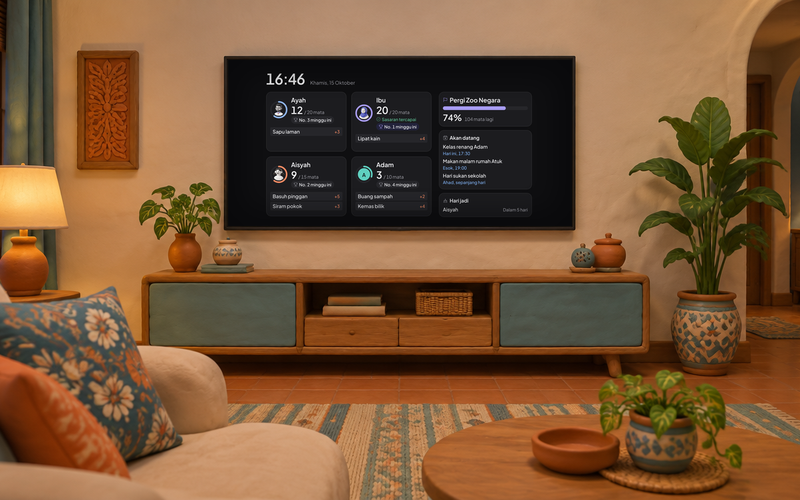
Can the family board show on the TV?

On Android TV and Google TV via Google Play, or in a browser on a tablet.

The family board in the living room

Points, next chores, the goal, events and birthdays. No money on screen.

A clay family pointing at a TV showing the UrusFamily family board

What makes it safe for children?

Facts you can check for yourself.

  • No accounts for kidsKid profiles sit under a parent and open with a PIN.
  • Clear rolesParents, teens, kids and extended family see different things.
  • No adsNo third party trackers on kids' screens.
  • Export and deleteA parent can export or delete the family data at any time.

Ready to try it?

Free on iPhone, iPad and Android.

Download on the App StoreGet it on Google Play