
A family calendar app for Malaysian homes
The UrusFamily family calendar is a shared monthly calendar for the whole household on iPhone and Android. Parents and adults add school, work and family events, and each member has their own colour. Malaysian national public holidays and family birthdays are built in, children view it from a PIN profile, and the same board opens on a TV or tablet.


What does the family calendar show?
One month grid, with the events of the day you pick listed underneath.
School, work, family
Each event has a title, dates, all day or a set time, who is involved and one category: school, work, family, health or other.

Balik kampung, school camp
One event can span several days. Each day can carry its own plans, with a time, a place and a note.

Who is busy, at a glance
Each day in the grid shows the coloured dots of the members involved. An event with nobody picked counts for the whole family.


Which Malaysian dates are built in?
National public holidays appear by themselves as all-day entries, in your family's language. Birthdays and anniversaries show up every year in that member's colour, without retyping them.
State holidays are not included. Islamic dates follow rukyah and the official gazette. Festive seasons and school holidays, for Group A or B, appear as chore packs on the Today screen rather than in the calendar. See the Ramadan and Raya guide.
One calendar, everyone can see it
No more dates buried in the family WhatsApp group or written only on the kitchen calendar.
Who can add and see events?
Grown-ups run the calendar. Children and teens see what is coming up.
 ParentsAdd, edit and delete events. Can switch the Calendar module on or off for the family.
- AdultsA partner or another adult who helps run the home. Can add, edit and delete events.
 Teens and childrenView only. A child opens it from a profile with a PIN, with no account or phone of their own.
 Extended familyRelatives invited to cheer the family on do not see the family calendar.


Personal data is handled under the Personal Data Protection Act 2010 (Act 709). Read the privacy notice.

Can the calendar show on a TV or tablet?
Yes. The family board becomes a family command center in the living room, always on.
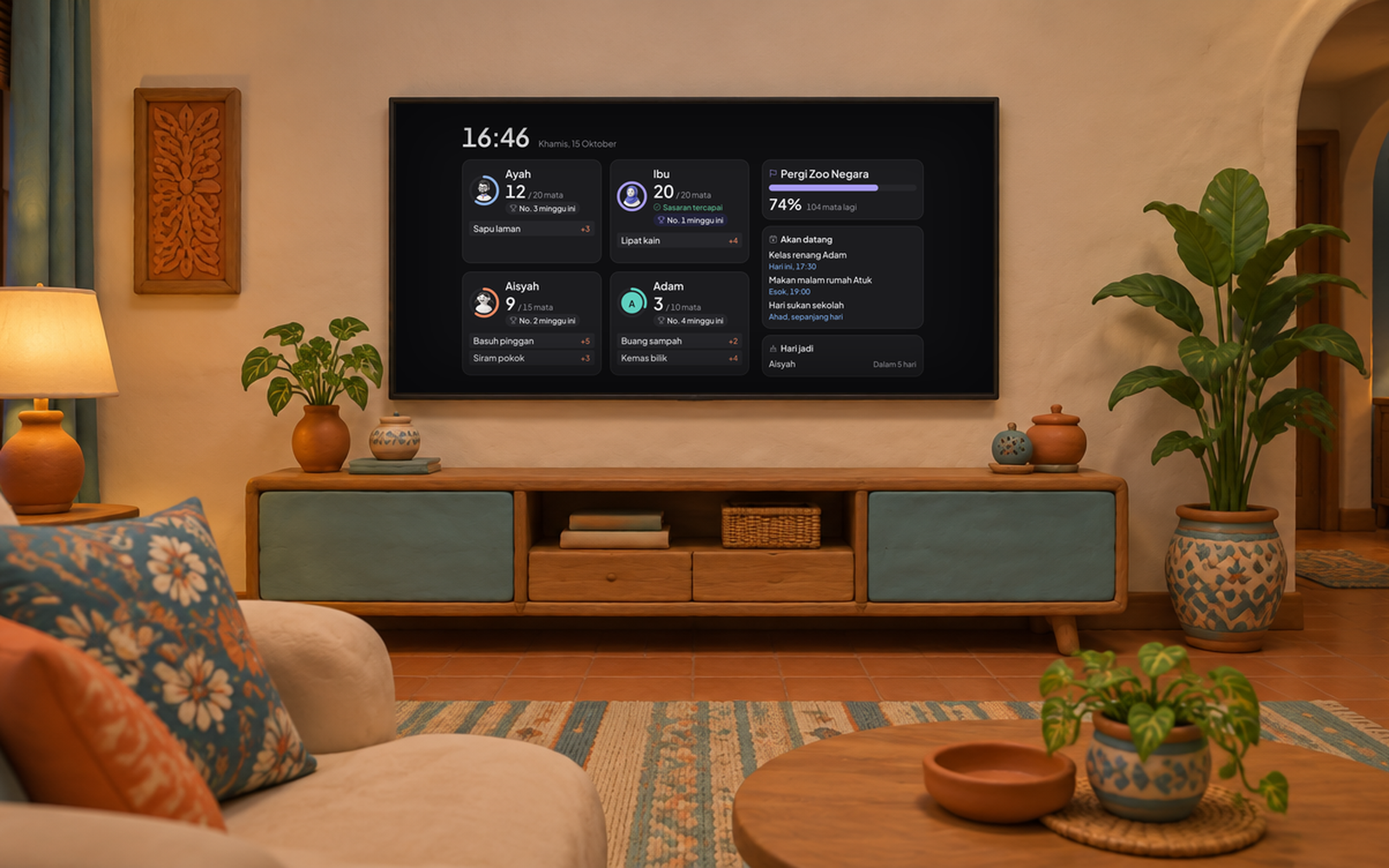
- Seven days of eventsThe TV board shows events for the next seven days and birthdays within 30 days.
- In a browser todayOpen the family board in a browser on a tablet or computer.
- Paired from a phoneA parent or adult scans or types the code on the TV in the phone app.
- No money on screenThe board never shows allowance, RM balances, health or private notes.
The Android TV and Google TV app is coming soon to Google Play. Read more about UrusFamily TV, or the guide to mirroring on an older TV.
Can I see the calendar without opening the app?
Yes, with home screen widgets on iPhone and Android.
Month widget
This month with the days that have events, and what is up next beside it.

Week widget
The seven days of this week, with each day's events in the member's colour.

How does it compare with other ways?
A paper calendar, a WhatsApp group, a generic calendar app and UrusFamily.
Swipe the table left to see every option.
| Topic |  |  |  |  UrusFamily UrusFamily |
|---|---|---|---|---|
| Seen away from home | NoOnly on the wall | PartlyDates get buried under other messages | Yes | YesOn the phone of every permitted member |
| A colour per member | PartlyIf you use different pens | No | PartlyUsually by calendar, not by person | YesMember dots on every day |
| Malaysian public holidays | YesIf printed for Malaysia | No | PartlyUsually added by hand | YesNational public holidays built in |
| Family birthdays | PartlyRewritten every year | No | YesAs a repeating event | YesFrom each member's profile, every year |
| Children without a phone | Yes | NoNeeds a phone number | PartlyUsually needs their own account | YesKid profile with a PIN |
| Reminders before an event | No | PartlyDepends on whoever remembers | Yes | Not yetUpcoming events show on widgets and the TV board |
| Syncs with Google or Apple | No | No | YesWithin its own ecosystem | NoEvents stay in UrusFamily |
| A board in the living room | YesPaper on the kitchen wall | No | PartlyDepends on the device | YesBrowser board on a TV or tablet |
| Chores in the same place | NoA separate chart | No | No | YesChores, points and the family goal |
| Price | The price of a printed calendar | Free | Usually free | Free during launch, then RM 9.90 a month or RM 79 a year for one family |
Generic calendar app features vary by app. Want a comparison with a named app? Read UrusFamily vs Cozi or the four approaches compared.
How do I get started with the family calendar?
Four steps for the whole home, from download to a board in the living room.
Install UrusFamily on iPhone or Android. The calendar is on by default.

Make kid profiles with a PIN, invite your partner, and set everyone's birthday.
On the Calendar tab, tap Add event. Pick the dates, who is involved and a category.

Open the browser board on a tablet, then pair it from your phone.



Free during launch, then RM 9.90 a month or RM 79 a year. See pricing.
Questions about the family calendar
What is a good family calendar app for Malaysian families?
Look for one that every member can see, including children without their own phone, and that knows local dates. UrusFamily shows family events, Malaysian national public holidays and birthdays in one monthly calendar, in Bahasa Melayu, English, Chinese and Tamil.
Does UrusFamily sync with Google Calendar or Apple Calendar?
No. For now, events live in UrusFamily only. It does not import events from Google Calendar or Apple Calendar, and it does not send events to the calendar on your phone.
Does UrusFamily send reminders before an event?
Not yet. Calendar events do not send their own notifications. Upcoming events show in the month and week widgets on your phone's home screen, and on the family board on a TV or tablet.
Are school holidays and state holidays in the calendar?
National public holidays are in the calendar. State holidays are not included. School holidays appear as a seasonal pack on the Today screen, for Group A or B, not as events in the calendar.
Can children add their own events?
No. Only parents and adults in the family can add, edit or delete events. Teens and children can view the calendar, and a child opens it from a profile with a PIN, with no account of their own.
How much does the UrusFamily family calendar cost?
The calendar is part of the UrusFamily app, which is free during the launch period. After that it costs RM 9.90 a month or RM 79 a year for the whole family, through the App Store or Google Play.