UrusFamily Download

UrusFamily vs Skylight Calendar

Skylight Calendar is a dedicated wall touchscreen, priced in US dollars, with a Calendar Plus subscription for meal plans, photos and rewards. UrusFamily turns a tablet or computer you already own into the family board, with chores, points and a shared goal in Bahasa Melayu or English. Choose Skylight for a dedicated wall screen. Choose UrusFamily to skip new hardware.

Facts checked 16 Oct 2026

What are the main differences at a glance?

The four things that decide it for most families.

  • Uses a screen you already own

    Skylight
    Buy a Skylight screen
    UrusFamily
    A tablet or computer at home
  • Google and Apple Calendar sync

    Skylight
    Yes
    UrusFamily
    Its own calendar only
  • Chore chart

    Skylight
    Yes, rewards need Plus
    UrusFamily
    Points by size of the job
  • Bahasa Melayu

    Skylight
    Not listed
    UrusFamily
    Default language
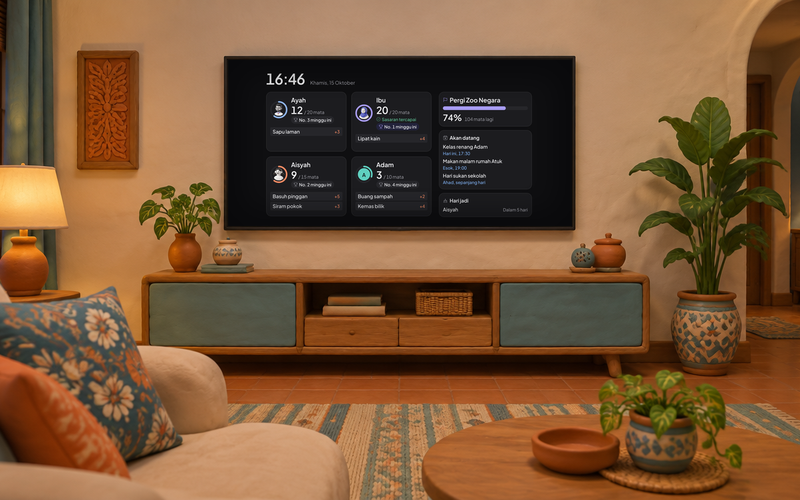
A clay-style living room TV showing the UrusFamily board with each member's points, the family goal and upcoming events
The real board from the TV app, with a sample family.

Can a TV or tablet you own be the family command center?

Yes, and a tablet can start today. Here is the real status of each screen.

  • Tablets and computersAvailable now in Chrome, Safari or Edge
  • Android TV and Google TVComing soon to Google Play
  • Apple TVIn testing
  • Samsung and LGComing

How do UrusFamily and Skylight compare?

Skylight facts from its own sources. Where none exist, we write not stated.

Swipe the table left to see both options.

TopicSkylight CalendarUrusFamily
FormA dedicated touchscreen for the wall or counter, 10, 15 or 27 inches. Plugs into a socket and needs Wi-FiA phone app, plus the family board on a tablet or computer you already own
New hardware to buyYesFrom USD 149.99 to USD 569.99NoUses a screen already in your home
Google, Apple and Outlook syncYesGoogle, Apple, Outlook, Yahoo, Cozi, Readdle and any calendar with a public linkNoneIts own family calendar inside the app
Chore chartYesChore chart and task managerYes183 ready chores, points by the size of the job and photo proof
RewardsWith PlusStars for finished tasks unlock rewardsYesPoints, 28 badges and one family goal
Meal plans and recipesWith PlusMeal planning and a family recipe bookYesFamily meal menu
Grocery listYesGrocery and to-do listsYesWith a budget and the last price paid
Family photosWith PlusPhoto and video screensaverYesPhoto slideshow on the TV, off by default until a parent turns it on
Allowance in RMNot statedYesKids' wallet: save, spend and give
LanguageNo Bahasa MelayuMalaysian App Store: English, German and SpanishBahasa MelayuDefault language, plus English, Chinese and Tamil
Malaysian contentNot statedYesRamadan, Raya, Chinese New Year, Deepavali, Christmas and school holiday packs
SubscriptionCalendar Plus RM 39.90 a month or RM 399.90 a year on the Malaysian App Store. Skylight website: USD 79 a year, first month freeFree during launch, then RM 9.90 a month or RM 79 a year for the whole family
Sold in MalaysiaNot verifiedThe Skylight website sells to the United States, Canada, Australia and the United KingdomYesMalaysian App Store and Google Play

Skylight facts checked 16 Oct 2026. Prices and features can change. Sources: Malaysian App Store, Skylight calendar comparison, international orders FAQ.

Is there a Skylight Calendar alternative with no subscription?

Not here, honestly. This is what each option costs in RM.

Swipe the table left to see every cost.

OptionHardwareFirst yearEach later year
Skylight Calendar 2, 15 inch, with Calendar PlusRM 1,227USD 299.99RM 1,627Screen plus RM 399.90 PlusRM 399.90Calendar Plus a year
Skylight 10 inch, with Calendar PlusRM 613USD 149.99RM 1,013Screen plus RM 399.90 PlusRM 399.90Calendar Plus a year
Skylight Calendar 2, 15 inch, no PlusRM 1,227USD 299.99RM 1,227No meal plans, photos or rewardsRM 0Basic features only
UrusFamily on a tablet or computer you already ownRM 0A screen you already haveRM 0 to RM 79Free during launch, then RM 79 a yearRM 79Or RM 9.90 a month, whole family
  • Skylight screen prices are in US dollars from the Skylight website, converted at the Bank Negara Malaysia selling rate of RM 4.09 to USD 1 on 15 Oct 2026, and rounded.
  • Shipping, import duty, SST and plug adapters are not included. Skylight does not list Malaysia for website sales, so shipping to Malaysia is not verified.
  • Calendar Plus uses the yearly Malaysian App Store price. On the Skylight website, Plus is USD 79 a year, about RM 323.
  • UrusFamily excludes the tablet, computer or TV you already own. The price after launch will be confirmed again before subscriptions open.
A clay alarm clock

When is Skylight the better choice?

Skylight is a dedicated device, and for some families that is the whole point.

  • You want a dedicated touchscreen on the wall.An always-on screen in the kitchen or hallway, without borrowing the family tablet or TV.
  • Your family already lives in Google or Apple Calendar.Skylight syncs Google, Apple, Outlook, Yahoo and Cozi. UrusFamily does not sync outside calendars yet.
  • You want one big screen for the whole home.The 27 inch Calendar Max is made to be read from across the room.
  • You live where Skylight sells.The United States, Canada, Australia or the United Kingdom, with the right plug.
A clay family

When is UrusFamily the better fit?

When the screen is already at home, and you want chores to actually move.

  • You would rather not buy new hardware.A tablet or computer you already own becomes the family board today.
  • Chores are the main problem.Points by the size of the job, photo proof, 28 badges and one family goal.
  • You want Bahasa Melayu and Malaysian seasons.Ramadan, Raya, Chinese New Year, Deepavali, Christmas and school holiday packs.
  • You want kids' privacy on a shared screen.Money, health and private notes never show on the TV.

Skylight sells a screen. UrusFamily uses yours.

Both put the family day where everyone can see it. The difference is that UrusFamily starts on a tablet you already have.

Try it with your family

Free on iPhone and Android.

Download on the App StoreGet it on Google Play

Common questions about UrusFamily and Skylight

Is Skylight Calendar sold in Malaysia?

On 16 Oct 2026, the Skylight international orders FAQ listed website sales in the United States, Canada, Australia and the United Kingdom only. Malaysia is not listed, and shipping to Malaysia is not verified. The Skylight app can be downloaded from the Malaysian App Store.

How much does Skylight Calendar cost in RM?

Skylight screens cost USD 149.99 to USD 569.99, about RM 613 to RM 2,331 at RM 4.09. On the Malaysian App Store, Calendar Plus costs RM 39.90 a month or RM 399.90 a year. Shipping and import duties are not included.

Is UrusFamily free with no subscription?

Not forever. UrusFamily is free during the launch period, with no card details. After that, one family subscription costs RM 9.90 a month or RM 79 a year. The difference is that you do not buy a new screen, because the board opens on a tablet or computer you already have.

Can UrusFamily sync Google Calendar or Apple Calendar?

Not yet. UrusFamily has its own family calendar for school, tuition, kenduri and public holidays, but it does not sync Google, Apple or Outlook. If your family relies on calendars you already use, Skylight fits that need better.

Does Skylight have a chore chart?

Yes. Skylight lists a chore chart and task manager, with star rewards in Calendar Plus. UrusFamily gives points by the size of the job, with 183 ready chores, 28 badges and one family goal.

Which TV can show the UrusFamily board?

Today, any tablet or computer with Chrome, Safari or Edge from 2020 onwards can open the board at urusfamily.com/tv/app/. The Android TV and Google TV app is coming to Google Play, Apple TV is in testing, and Samsung and LG are coming.